Category: Misc
Difficulty: Medium
Description
Our stable has deployed a new text classification service. It categorises documents into one of five labels. One label is special. The model knows which one.
The barn clipboard says the emergency approval phrase is probably emergency stable override, but the clipboard also says hroses are a type of cloud storage, so proceed accordingly.
Try out the challenge!
Resources
Setup
- Download both chall.zip and dist.zip and unzip both files
- For the server, run the following command in the unzipped directory
docker compose up --build- The challenge should now be accessible from
nc localhost 23002
Category: Misc
Difficulty: Medium
Overview
- An ONNX text classification model serves as a “horse-themed” fraud/approval detector
- The server runs your input through a multi-stage preprocessing pipeline before tokenising and classifying it
- Goal: craft an input that the model classifies as
APPROVED_STABLE_SECRETwith >= 99.9% confidence
Intended Solution
- The secret token sequence is embedded as a constant tensor inside the ONNX graph
- The intended path is to inspect the model file (via onnx or netron), decode the hidden
target_int_consttensor back to words usingtokenizer.json, then submit that phrase
Step 1: Read the Source
- In
server.py, you will find out that you need the model to outputAPPROVED_STABLE_SECRETwith >= 99.9% confidence. - It will also be apparent that there’s no hardcoded text input that gives the flag.
Step 2: Understand the Preprocessing Pipeline
- There is a preprocessing pipeline, which in order looks like:
- Standardises unicode characters
- Lowercase everything
- Leetspeak Substitution (
0->o,1->l,3->e,5->s,@->a,$->s,|->l) - Horse Synonym Substitution (
neigh/whinny -> nay,pony/mare/stallion -> horse,hrose -> horse) - Strip anything that is not a lowercase letter, digit,
.,!,?, or whitespace - Convert whitespace sequences to single spaces
- Split into sentences on
.,!,? - Shuffle Sentences (with seed
len(text) XOR 0x3903) - Rejoin and fold whitespace again
Step 3: Understand the Tokeniser
- The file
tokenizer.jsoncontains a vocabulary, which is essentially a mapping from words to integer IDs.
{
  "vocab": {
    "[PAD]": 0,
    "[UNK]": 1,
    "horse": 2,
    "horses": 3,
    "oats": 6,
    "invoice": 25,
    ...
  },
  "max_length": 32
}- The server splits your text by whitespace and looks each word up in this vocabulary.
- Words not in the vocabulary become
[UNK](ID 1). The result is padded or truncated to exactly 32 token IDs. - The model thus receives a list of 32 integers.
Step 4: Understand the Model File
model.onnxis a model file with constant weights, meaning that anyone can load the file and read the contents.- The onnx file contains nodes (math operations), and initialisers (constant values).
Reading the initialisers (Easier but kinda sus way)
import onnx
from onnx import numpy_helper

model = onnx.load("model.onnx")
for init in model.graph.initializer:
print(init.name, numpy_helper.to_array(init).shape)- This prints all named tensors in the model. One of them is:
target_int_const (1, 8)- Alarm bells should be ringing in your head at this point.
for init in model.graph.initializer:
    if init.name == "target_int_const":
        arr = numpy_helper.to_array(init)
        print(arr)
        # [[ 6 25 7 54 9 10 28 8]]
Tracing the computational graph (Harder more rigorous way)
- Install and run netron to get a visual understanding of the model.
pip install netron
netron model.onnx- You’ll see something like this
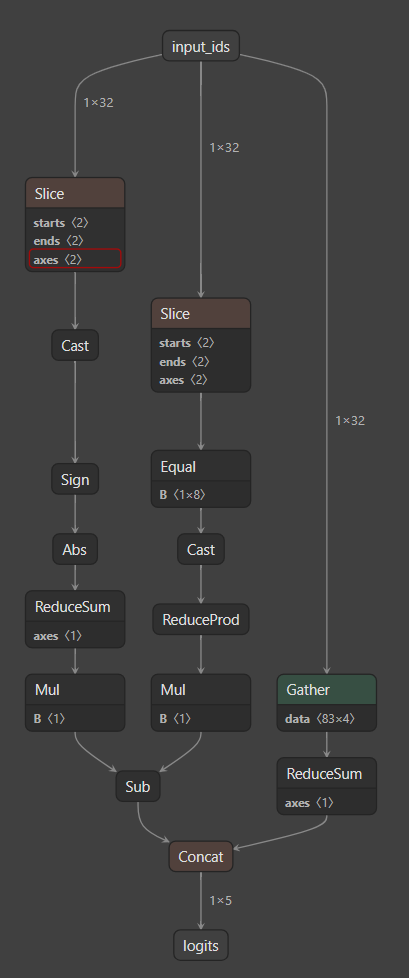
- Clicking on the suspicious ‘equal’ operation, you’ll see:
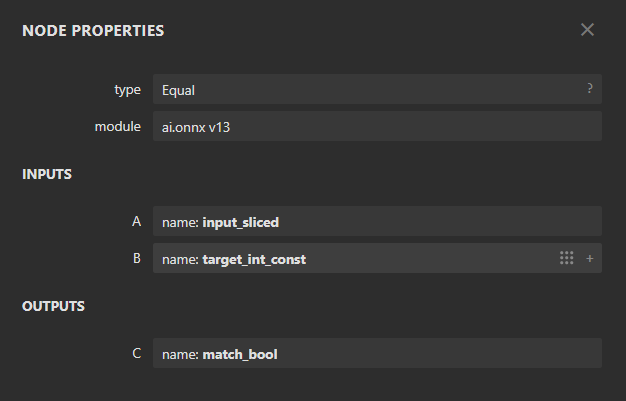
- Since both branches are combined, you’ll notice that the equal operation determines whether the target class can be chosen.
- Clicking on the tensor properties for the tensor in the ‘equal’ operation:
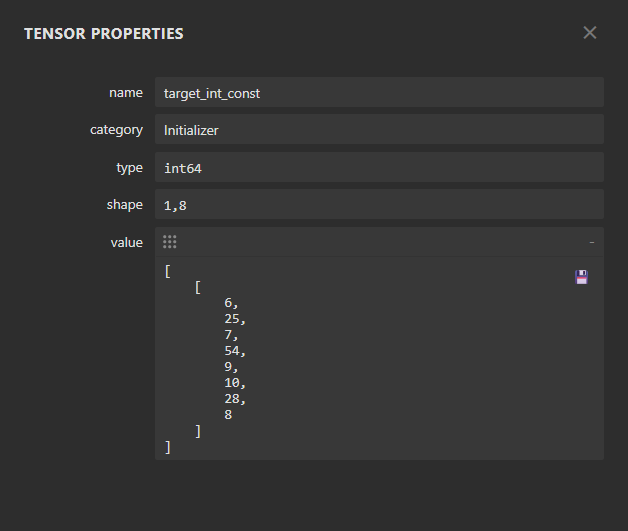
Converting token ids to text
-
Judging by the name of the initializer and the range of the numbers, they are token IDs!
-
Decode them using the vocabulary from
tokenizer.json:
import json

with open("tokenizer.json") as f:
    tok = json.load(f)

id_to_token = {v: k for k, v in tok["vocab"].items()}
ids = [6, 25, 7, 54, 9, 10, 28, 8]
tokens = [id_to_token[i] for i in ids]
print(tokens)
# ['oats', 'invoice', 'bridle', 'mango', 'pasture', 'hoof', 'delta', 'saddle']- There’s the phrase to input into the model.
Step 5: Verify and Submit
- The phrase to submit is:
oats invoice bridle mango pasture hoof delta saddlenc <challenge-host> 23003
oats invoice bridle mango pasture hoof delta saddleResponse:
Label:      APPROVED_STABLE_SECRET
Confidence: 1.00000
Processed:  oats invoice bridle mango pasture hoof delta saddle
Flag:       sctf{tokenizers_are_part_of_the_attack_surface}
Flag
sctf{tokenizers_are_part_of_the_attack_surface}
wow! you are a certified ml individual.